
How to Set Up WooCommerce Dropshipping (Step by Step)
Quick answer: To set up WooCommerce dropshipping, get hosting and install WordPress, install the free WooCommerce plugin, configure payments and shipping, then add a dropshipping plugin (such as WooDropship, AliDropship or Spocket) or connect a fulfillment agent. Import products, set your prices, and let orders flow to your supplier automatically, with tracking numbers sent back to your customers.
Dropshipping is expected to continue to thrive. You can start a dropshipping business on a variety of platforms. But today we are going to focus on WooCommerce dropshipping. WooCommerce is an easy-to-use eCommerce platform. Because of its easy customization options, anyone without technical expertise can easily build their own online store on WooCommerce. So most dropshippers are using it.

What Is Dropshipping?
Dropshipping is already one of the easiest, most convenient, and most profitable ways for budding entrepreneurs to make money online. Some key benefits are that you don’t need to stock your products. And don’t need a big budget to get started selling products online. Just add products to your online store. They are shipped directly from your suppliers to your customers.
Why Use WooCommerce for Dropshipping
WooCommerce is a WordPress extension, a powerful tool for managing your dropshipping store. E-commerce competition is more exciting, but dropshipping on WooCommerce can make you stand out. Nearly 10% of e-commerce sites worldwide use it.
The following is the convenience of using WooCommerce, which is why we choose WooCommerce for dropshipping.
1
An easy-to-use website
Choose a dropshipping plugin and a WooCommerce setup so that customers can easily search for different products on your eCommerce site without hassle. A product search feature within your site may be helpful so that your customers can find what they need faster.
2
Multiple payment options
Pick a checkout process that allows your customers to choose the payment method that best suits their needs.
3
Extra features
Think about what kind of features would make life easier for you and your customers. Does an image editor on your website, for example, make it easier to match dropshipping products to your company’s style? Would it help to have a dropshipping service that could automatically design shopping packing slips with your company’s branding?
4
Convenient order tracking
It is helpful to give customers a way to track their orders since drop shipments can take a while to be delivered. Sometimes even email notifications or order notifications help to show customers where their products are.
5
Providing the best customers support
Delivered by WooCommerce website.
WooCommerce can also be used to:
Manage your dropshipping store.
Start AliExpress Dropshipping with a free Google Chrome extension.
Quickly import each supplier’s inventory.
Allocate inventory to specific suppliers.
Amazon affiliate support.
Customized emails, packing slips, and invoices for suppliers and customers.
Provide the customer with the tracking number of the product.
Use the WooCommerce dropshipping dashboard to know about your store and order details.
What Tools Do You Need for WooCommerce Dropshipping?
Each dropshipping setup will be a little different. A few drop shippers will find that they are better off utilizing a plugin that connects their store to AliExpress (which is best for shipping ePacket products from China to countries around the world).
The fact that others work from the US or Europe implies that you are more likely to get better shipping times from a solution like Spocket. Chances are you may also find that you want to sell high-end products or even print your own designs – both of which require different plugins and dropshipping services.
General setup you would need to launch your dropshipping store.
The WooCommerce plugin for drop shipping.
WordPress.
Quality hosting.
WooCommerce Dropshipping Plugin
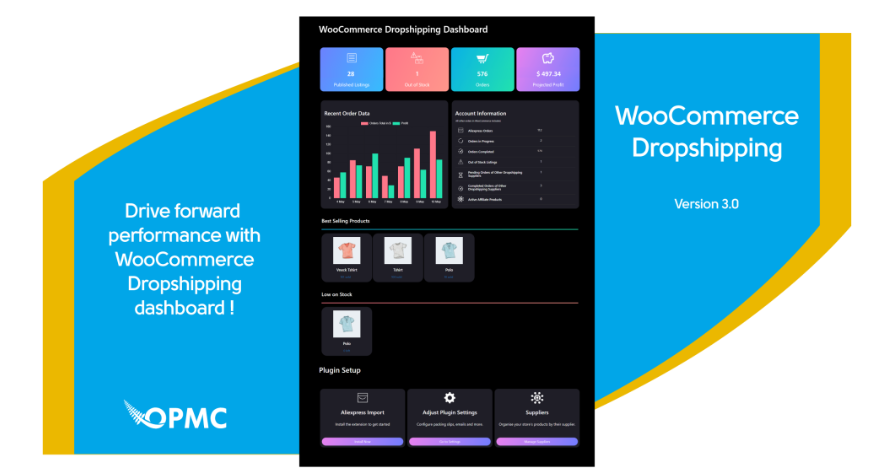
WooCommerce allows you to send order notification emails to your wholesale resellers automatically. As soon as a new order is placed on your WooCommerce store, the vendor receives an email, which simplifies the delivery process.
The order notification email sends the packing slip PDF file with the order, which also simplifies the process for resellers. Your vendor can print the PDF file directly from your order email and attach it to the package.
Why Use WooDropship Dropshipping Plugin
WooDropship is a free plugin that can easily import products from the AliExpress eCommerce store. With just one click its users can import products and set their own prices for the arbitrage of the products. Following are a few important features of the WooDropship plugin.
One-click to import AliExpress products
Features easy product customization
Built-in image editor
Automatically fulfill orders
Allows you to set your own selling prices
You can upload over three thousand products with the basic WooDropship plugin.
How to Set Up WooCommerce With a Dropshipping Plugin
1
Set up WooCommerce dropshipping Store
2
Add Free Shipping Option
3
Sign up for WooDropship WooCommerce Plugin
4
Install WooDropship Chrome Extension
5
Import Products from AliExpress to Your Store Using WooDropship Plugin
Best WooCommerce Dropshipping Plugins
AliDropship. AliDropship is a WordPress dropshipping plugin for the Chinese retail giant, AliExpress.
WooDropship. WooDropship is another WooCommerce dropshipping plugin that works with AliExpress.
Spocket. Free trial available.
WooCommerce Dropshipping Automation
Using the powerful, feature-rich automation features in AutomateWoo, you can create virtually endless automated workflows to help your store grow with a fraction of the effort.
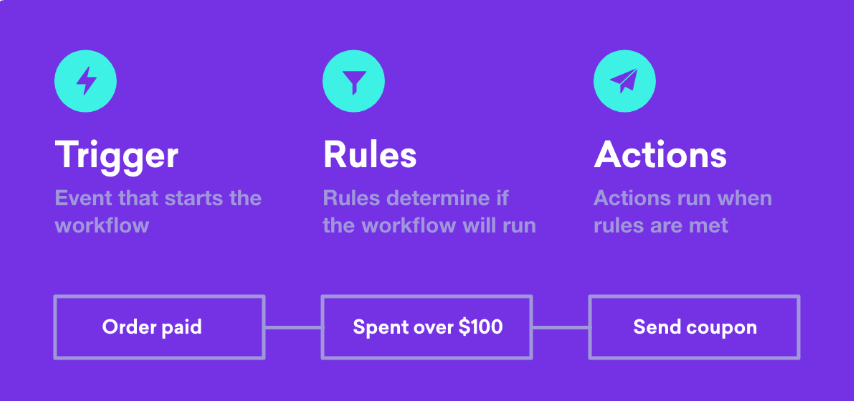
Triggers dictate under what circumstances the workflow will run. One example of a trigger is what to do when an order is available.
Rules allow you to perform more sophisticated logic on your workflows so that they only trigger under certain circumstances. An example would be to trigger a workflow only for orders that total more than $100.
Actions are defined when a workflow is triggered. In AutomateWoo, there are a range of customizable actions for you to use, such as sending an email, changing the status of an order, or if you are a developer, you can define a custom function.
Dropshipping Plugin for WordPress
10 Best Dropshipping Plugins for WordPress
WooCommerce. WooCommerce is one of the most popular WordPress plugins and best of all – it’s free.
Dropified
Checkout Manager for WooCommerce
Dropship
Easy
AliDropship
OptinMonster
WooCommerce Wishlists
WooCommerce Dropshipping Without a Plugin
Plugins that import products from AliExpress are only one option. If you want better product quality, branded packaging and faster shipping, you can connect your store to a fulfillment agent instead. Honest FulPhilment connects to WooCommerce with a REST API key, so no plugin is needed: orders sync to our China warehouse automatically, in-stock orders are dispatched within 24 hours, and tracking numbers are sent back to your store. You can also upload orders by CSV/Excel. See our WooCommerce fulfillment page for details.
Conclusion
If you want to start a dropshipping business or would like to know more about our dropshipping service, get in touch with us today.


FAQ
Can you dropship with WooCommerce?
Yes. WooCommerce is a free WordPress plugin that turns a WordPress site into an online store, and with a dropshipping plugin or a connected fulfillment partner your suppliers ship orders directly to your customers.
How do I set up dropshipping on WooCommerce?
Get hosting and install WordPress, install WooCommerce, set up payments and shipping, then add a dropshipping plugin such as WooDropship, AliDropship or Spocket, or connect a fulfillment agent. Import products, set your prices and test an order before launching.
What is the best WooCommerce dropshipping plugin?
Popular choices include AliDropship and WooDropship for AliExpress products, Spocket for US and EU suppliers, and Dropified for order automation. The best one depends on where your suppliers are and how many products you plan to import.
Do I need a plugin to connect WooCommerce to a fulfillment agent?
Not always. Some agents connect through the WooCommerce REST API instead. Honest FulPhilment, for example, connects to WooCommerce with a REST API key, so no extra plugin is needed to sync orders and tracking.
Can WooCommerce dropshipping be automated?
Yes. Dropshipping plugins and fulfillment integrations can pass orders to suppliers automatically and sync tracking numbers back, and tools like AutomateWoo can automate emails and order status changes.