
How to Set Shopify Shipping Zones and Rates from China
Quick answer: To set Shopify shipping zones and rates, open Settings → Shipping and delivery, pick a delivery profile, add a zone (one country or a group), then add weight-based rates. Checkout does not call your China 3PL live — it only shows the table you saved. Honest FulPhilment Rate Sync writes our freight cost plus your markup into a profile named Honest Fulfilment Rates. Packing and EU duty stay on our invoice; they are not the Shopify shipping price.
If you only need Shopify’s own label tool (USPS / UPS in the admin), see how Shopify Shipping works. This guide is for stores that ship from China and need checkout freight to stop being a guess.
What is a Shopify shipping zone?
A shipping zone is a group of countries or regions inside a delivery profile that share the same checkout rates. A customer only ever sees the rates of the zone their address falls into — that is how one profile can charge $8 to Germany and $15 to the United States. Zones are created in Settings → Shipping and delivery; Shopify’s own walkthrough is Setting up shipping zones.
Inside that page you work with three layers:
| Layer | What it is | Example |
|---|---|---|
| Delivery profile | A set of products that share shipping rules | “China fulfilment” vs “US warehouse” |
| Shipping zone | Destinations inside that profile | United States; or DE + FR + NL |
| Rate | The price the customer sees | YunExpress Clothing Line, 0–500 g, $10.90 |
Shopify lets you mix free, flat and weight-based rates in the same zone. For China fulfilment, weight-based rates per country are the ones that stay honest. A 200 g T-shirt and a 2 kg kettle should not share a $12 flat rate.
Shopify Markets vs shipping zones
These get confused constantly. Markets decide what a customer sees and pays — currency, language, product prices and, on some setups, duties collected at checkout. Shipping zones decide what that same customer is charged for delivery. A market is not a zone: adding a country to a market does not create a shipping zone for it. If a new market has no zone in the delivery profile, Shopify falls back to that profile’s default rates, and your real freight is never charged.
How to edit or delete a zone
- Settings → Shipping and delivery → open the delivery profile that holds the products.
- Click the zone: add or remove countries, rename it, or edit and delete single rates.
- Delete removes the zone and every rate inside it. Move any countries you still ship to into another zone first.
- Zones in Honest Fulfilment Rates are rewritten by Rate Sync on the next push — it deletes zones for countries that dropped out of the matrix — so change those in the app, not by hand.
How to set shipping rates on Shopify
You can type the table by hand, or let Rate Sync write it.
By hand
- Shopify admin → Settings → Shipping and delivery.
- Open the delivery profile that holds the products you ship from China (or create one).
- Create zone, add one country (or a tight group such as DE + FR + NL).
- Add rate → weight-based. Enter ranges that match your 3PL (0–500 g, 500–1000 g, and so on) and a sell price for each.
- Repeat per country. Save, then place a test order and check checkout.
With Rate Sync — skip the typing. Settings → Shopify Rate Sync in the Honest FulPhilment Shopify app builds the same weight-based table from our freight cost plus your markup, then pushes it to Honest Fulfilment Rates. Steps are below.
Why checkout prices drift when you ship from China
Checkout does not ask our warehouse “what would this parcel cost today?”. That live quote is the shipping calculator (or the shipping-rates API). Checkout only reads the last table you saved. That table goes stale when:
- A carrier changes a weight bracket or a fuel surcharge
- You add a new destination and leave it on the default rest-of-world rate
- You typed a round number ($9.99 everywhere) instead of cost + markup
- Australia or Canada needs a postcode zone, but you only have a country rate
The result is either a loss at checkout (customer paid $4, the line costs $11) or a cart that looks expensive (you padded every country to be safe). Both are zone problems, not product problems.
What China freight actually costs
Every “set your rates” guide stops before the number that matters. These were the cheapest standard lines from our China warehouse for a 500 g parcel on 26 October 2026 (YunExpress Clothing Line on all four; freight is charged at cost, no markup — live prices for any weight are in the shipping calculator):
| Destination (500 g) | Transit | Freight at cost |
|---|---|---|
| United States | 6–14 days | $14.68 |
| Germany | 5–10 days | $8.72 |
| United Kingdom | 4–8 days | $7.90 |
| Australia | 5–12 days | $7.08 |
The cheapest standard line for a 1 kg parcel to the US that day was $23.39, 59% more than the same parcel at 500 g. That ratio is the whole argument against one flat rate: $9.99 everywhere loses about $4.70 on a US parcel and earns about $2.90 on an Australian one.
With 15% markup and ceil to .90 the German rate becomes $8.72 × 1.15 = $10.03 → $10.90 at checkout. Rate Sync prices each weight bracket from the middle of its range, so check the preview’s cost column rather than this table — the preview is the number that gets written into Shopify.
What shipping rates can you put in a zone?
Shopify gives you four rate types, and only one of them fits a China 3PL by default:
| Rate type | Shopify shows | When it fits a China 3PL store |
|---|---|---|
| Free shipping | $0 | Only if you folded shipping into the product price, or you absorb it above a threshold |
| Flat rate | One price per zone | Fine for one country and one typical weight; breaks as soon as weights spread |
| Weight-based | Price per weight range | The default for Honest FulPhilment lines (for example 0–500 g, 500–1000 g) |
| Calculated carrier rates | Live USPS / UPS style labels | Not your China warehouse lines |
Shopify Shipping’s live carrier rates are for labels you buy in the admin. They do not quote YunExpress, 4PX or Yanwen from Henan. Those belong in the weight-based table.
One correction, because it comes up in every call: Shopify can put a live quote at checkout. Third-party carrier-calculated shipping lets a carrier service app answer the checkout with real rates (Shopify doc, carrierService API) — it needs the app and a plan that includes carrier-calculated shipping. Honest FulPhilment does not offer that connector, which is exactly why Rate Sync writes a static table instead.
How Rate Sync fills the zones for you
Honest FulPhilment Rate Sync writes that weight-based freight table into Shopify so you do not maintain it by hand. In the app: Settings → Shopify Rate Sync.
- Save — pick the store, a markup (sell = cost × (1 + %)), rounding (none, ceil to .90, or nearest .50), up to 15 countries and 8 methods.
- Preview — the app builds a draft matrix: country × method × weight. Each row shows cost, the live checkout price, the new sell price, and a LOSS flag if sell would go below freight cost.
- Approve & push — those rows become static rates in the delivery profile Honest Fulfilment Rates. Turn Auto apply on if you want later fee changes to push without this step.
Enable keeps the draft fresh when our freight fees change. Checkout still does not call us when the customer clicks shipping.
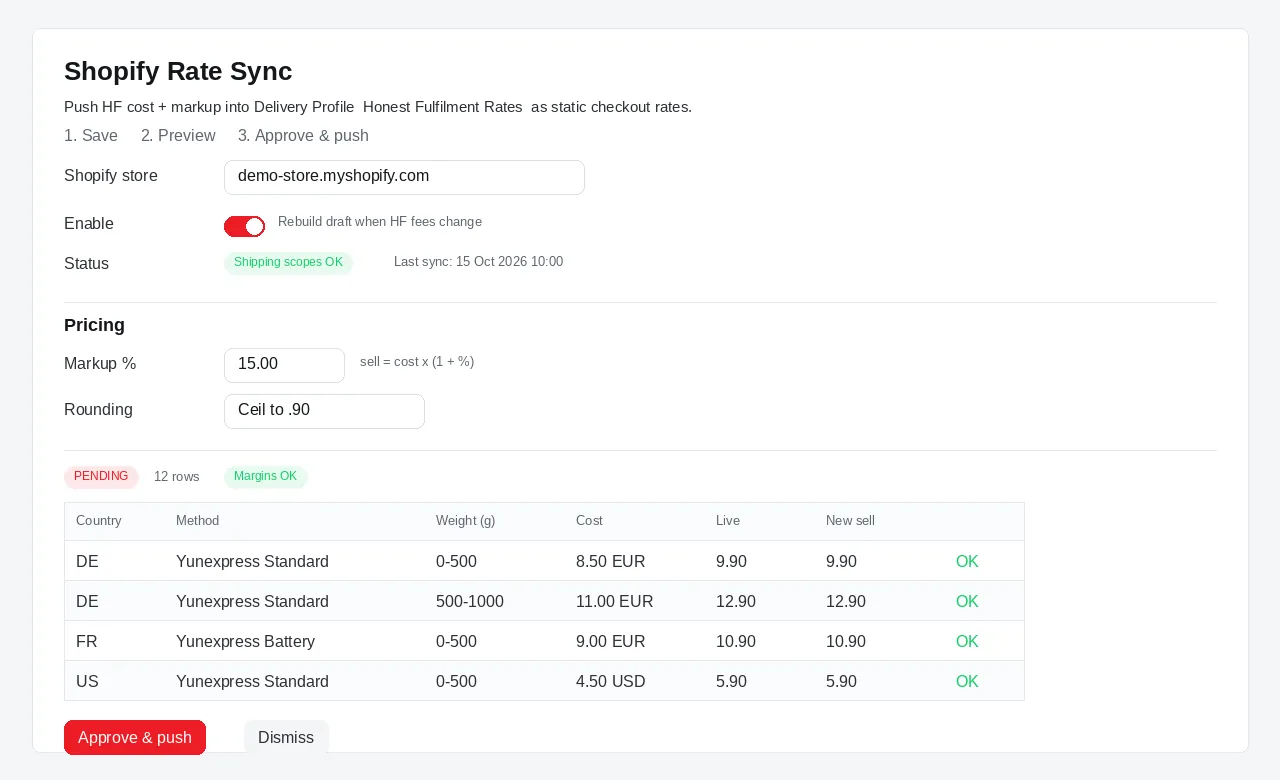
Settings → Shopify Rate Sync (demo). Markup 15%, rounding to .90, then a draft for DE / FR / US before you Approve & push.
What Rate Sync puts in checkout — and what stays on our invoice
The synced sell price is shipping-line cost + your markup. That matches the weight-bracket freight we use to bill shipmentAmount.
It does not include the rest of the Honest FulPhilment bill:
| Charged where | What |
|---|---|
| Shopify checkout (Rate Sync) | International freight + your markup |
| HF order invoice | Product, China domestic shipping, packing ($2.00 → $1.00 per order), sourcing, insurance, tax, EU duty (~€3 × distinct SKU) |
A German checkout that shows $5.90 shipping can still leave you paying packing plus about €3 duty on our invoice. If you want the customer to cover those, fold them into the product price or raise the Rate Sync markup — do not expect Shopify shipping to add them automatically.
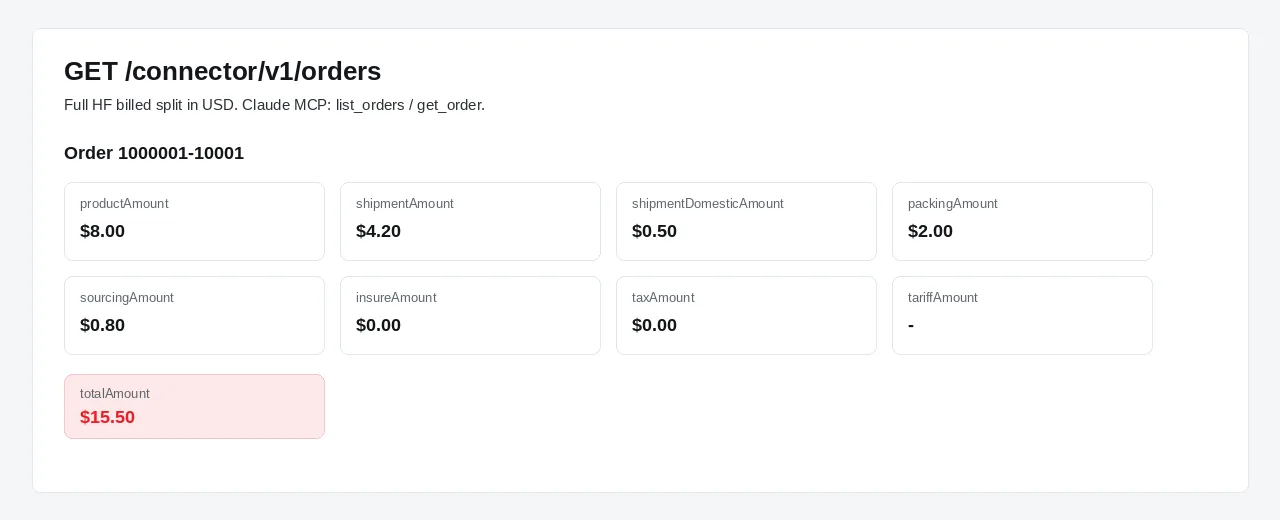
Same numbers the app and the Connector API return (demo). tariffAmount is EU duty. Rate Sync does not write this split into Shopify.
Need the freight and packing and duty for a script or Claude? That is the live quote, not checkout: GET /connector/v1/shipping-rates on the AI integration page. Pass items=SKU:qty or weight in grams. Each option returns carrier, USD freight, transit window, packingAmount and EU tariffAmount (€3 × distinct SKU; omitted outside the EU).
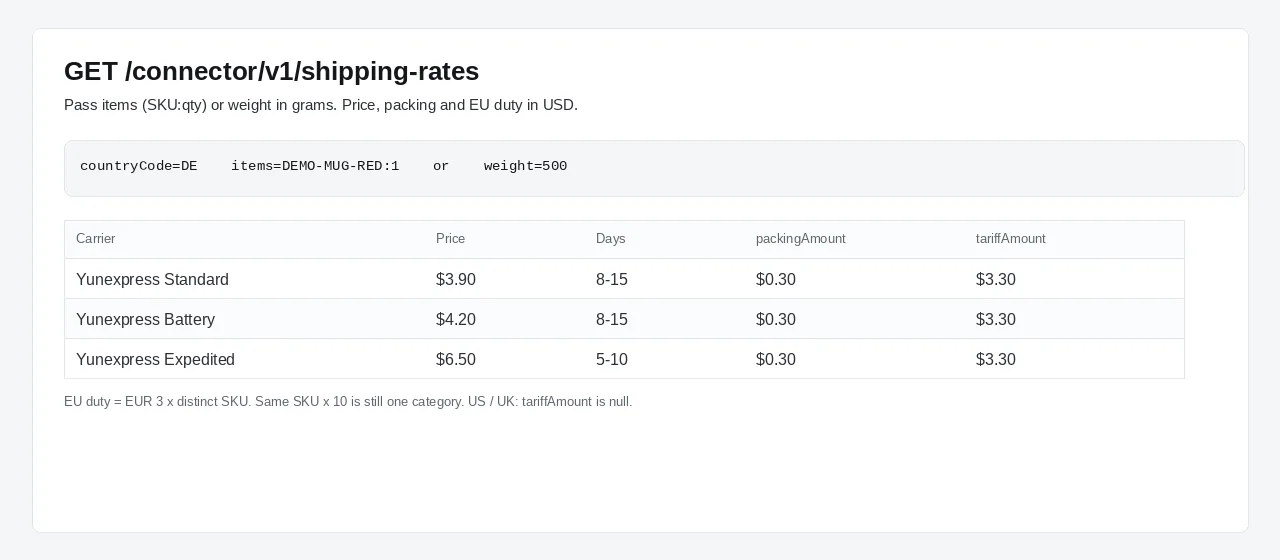
Connector live quote (demo). Checkout does not use this call. WooCommerce stores use the same API; Rate Sync itself is Shopify-only.
What Rate Sync will and will not do
| It does | It does not |
|---|---|
| Create or update only Honest Fulfilment Rates | Touch your other delivery profiles or Shopify Shipping labels |
| One freight rate per country + method + weight range | Add packing, sourcing or EU duty to the Shopify shipping price |
| Convert CNY freight into the shop currency (USD, EUR, GBP, AUD, CAD and other common codes) | Recalculate on every checkout |
| Rebuild a draft when our freight fees change (if Enable is on) | Push automatically unless Auto apply is on |
| Flag LOSS rows before you approve | Hide a below-cost rate if you approve it anyway |
| Work on a connected Shopify store | Sync WooCommerce checkout rates (Woo still uses the live API / calculator) |
Hard limits, because Shopify caps how many rate rows a profile can hold: 15 countries, 8 methods, about 8 weight brackets each, and a ceiling of about 600 rows. If the estimate is over the cap, drop a country or a method.
Older store connections may be missing read_shipping / write_shipping. The page will ask you to re-authorize before the first push.
How to set Shopify Rate Sync
- Install the free Honest FulPhilment app and connect the store. Paid orders already sync; Rate Sync is under Settings → Shopify Rate Sync.
- If the page says scopes are missing, re-authorize so Shopify can write the delivery profile.
- Set markup and rounding. Fifteen percent and “ceil to .90” is a common starting point (a $4.50 freight cost becomes $5.90).
- Choose the countries you actually sell to. Top 15 from orders fills this from your history.
- Choose the methods you already mapped on products (Standard, Battery, Expedited, and so on).
- Preview. Check every LOSS row. Dismiss the draft if the markup is too low; do not push a loss into checkout.
- Approve & push. In Shopify, open Settings → Shipping and delivery and confirm the Honest Fulfilment Rates profile lists a zone per country and a rate per weight.
- Place a test order to that country and confirm checkout shows the new sell price. Then open the matching HF order and confirm packing / duty still sit on our invoice. If the paid order stays Unfulfilled, see why Shopify orders stay unfulfilled.
Want the raw freight before you pick a markup? Use the public shipping calculator — no account needed. Pick-and-pack and sourcing tiers are on pricing.
Keep the rest of Shopify shipping as it is
Rate Sync does not replace how third-party fulfillment works on Shopify. You still map SKUs, let paid orders import, and get tracking written back on dispatch. The only new piece is what Shopify charges for shipping at checkout.
If some products ship from a different place (a US 3PL, or you), keep them on a separate delivery profile. Shopify will pick the profile that contains the product in the cart. Mixed carts follow Shopify’s own combination rules — do not put those SKUs in Honest Fulfilment Rates.
When a zone still needs a human
- Free-shipping thresholds. Rate Sync writes paid freight rates. If you offer free shipping over $75, add that rate yourself on the same profile or on another one, and make sure it does not hide the weight-based options you still need below the threshold.
- Rest of world. Anything you did not sync stays on Shopify’s default. Either add the country to Rate Sync (if you have a slot) or set a high “do not ship” / custom rate so you are not surprised.
- AU / CA postcodes. We price those more finely in the warehouse. Shopify will show one country rate per method and weight. If a remote postcode costs more, either absorb it or exclude that destination.
- EU duty and packing. Still billed on the HF order. Do not treat a Rate Sync LOSS flag as “the whole landed cost is covered.”
Once the profile is in place, treat it as a living table: Enable on, review LOSS rows when freight fees move, and keep markup high enough that checkout never sells shipping below our freight cost.
FAQ
What is a Shopify shipping zone?
A shipping zone is a group of countries or regions that share the same checkout rates. You create a zone (for example United States, or Germany and France together), then add one or more rates — free, flat, or weight-based — that customers in that zone see at checkout.
How do I add a shipping zone in Shopify?
Go to Settings → Shipping and delivery, open a delivery profile, click Create zone, add countries or regions, then add rates to that zone. Stores that ship from China usually make one zone per country and use weight-based rates, not one flat rate for the world.
How do I set shipping rates on Shopify?
In Shopify admin go to Settings → Shipping and delivery, open a delivery profile, add or edit a shipping zone, then add rates. Most stores that ship from China use weight-based rates per country so a 200 g parcel and a 2 kg parcel are not charged the same. Honest FulPhilment Rate Sync can write that table for you.
Can I have different Shopify shipping rates by product weight?
Yes. Add a weight-based rate in the zone and set a price for each weight range, for example 0–500 g and 500–1000 g. That is the rate type China 3PL lines use. Shopify's calculated carrier rates (USPS, UPS) do not quote YunExpress or Yanwen from China.
What is the difference between a shipping zone and a delivery profile?
A delivery profile is a set of products that share the same shipping rules. Inside that profile you create shipping zones and rates. Use more than one profile when some SKUs ship from a different place or need different prices, for example local stock versus China fulfilment.
Why are my Shopify checkout shipping rates wrong?
Checkout only shows the static rates you saved in a delivery profile. It does not look up your 3PL's live price. If you typed a flat $9.90 for every country, or you never updated rates after a carrier change, customers underpay or overpay. The fix is to copy real weight-based freight costs into the zone, then add your markup.
Does Shopify checkout use live carrier rates from China?
Not by default. Shopify's own calculated rates cover labels you buy in Shopify Shipping (USPS, UPS and similar in supported countries). A live checkout quote is possible only through third-party carrier-calculated shipping, where a carrier service app answers checkout — Honest FulPhilment does not provide that connector. Parcels leaving a China warehouse use your 3PL's lines, so their freight has to be written into the delivery profile as ordinary rates.
What is Honest FulPhilment Rate Sync?
A free setting in the Honest FulPhilment Shopify app (Settings → Shopify Rate Sync). You set a markup and rounding, pick up to 15 countries and 8 shipping methods, preview a country × method × weight table, then Approve & push. The app writes those prices into a delivery profile named Honest Fulfilment Rates. Checkout reads that table; it does not call Honest FulPhilment live.
Does Rate Sync include packing and EU duty in the checkout price?
No. Rate Sync writes freight cost plus your markup only — the shipping line for that country and weight bracket. Pick and pack ($2.00 down to $1.00) and EU duty (about €3 per distinct SKU) stay on the Honest FulPhilment order invoice. Fold those into the product price or raise markup if you want checkout to cover them.
How is EU duty charged on China-to-EU Shopify orders?
Honest FulPhilment bills about €3 per distinct SKU on EU parcels. That amount appears on the order as tariff, not as a Shopify shipping rate. Rate Sync does not add it to checkout. The live shipping-rates API returns tariffAmount so you or Claude can see it before you pay the order.
Does Rate Sync work with WooCommerce?
No. Rate Sync writes a Shopify delivery profile only. WooCommerce stores still import orders and can use the same live shipping-rates API or the public shipping calculator. Checkout rates on Woo are set in WooCommerce, not by Rate Sync.
Will Rate Sync change my other Shopify shipping profiles?
No. Only the delivery profile named Honest Fulfilment Rates is created or updated. Your other profiles, carrier tables and local pickup settings stay as they are.
What is the difference between Shopify Markets and shipping zones?
Markets decide what a customer sees and pays — currency, language, product prices and, on some setups, duties collected at checkout. Shipping zones decide what that same customer is charged for delivery. A market is not a zone: adding a country to a market does not create a shipping zone for it. If a market has no zone in the delivery profile, Shopify falls back to the profile's default rates, so your real freight never gets charged.
How do I edit or delete a Shopify shipping zone?
Go to Settings → Shipping and delivery, open the delivery profile, then click the zone. You can add or remove countries, rename it, or edit and delete individual rates. Deleting a zone removes every rate inside it, so move the countries you still ship to into another zone first. Zones in the Honest Fulfilment Rates profile are rewritten by Rate Sync on the next push (it deletes zones for countries no longer in the matrix), so change those in the app, not by hand.
Can Shopify show live rates at checkout?
Only through third-party carrier-calculated shipping: Shopify calls a carrier service app at checkout and shows the quote it returns, which needs the app plus a Shopify plan that includes carrier-calculated shipping. Honest FulPhilment does not provide that connection today. Rate Sync writes our freight as static weight-based rates instead, which is why the table has to be pushed again when our fees change.
How much does it cost to ship a 500 g parcel from China to the US?
On 26 October 2026 the cheapest standard line for a 500 g parcel from our China warehouse to the United States was $14.68 (YunExpress Clothing Line, 6–14 days). A 1 kg parcel was $23.39. Freight is charged at cost with no markup; live prices for any destination and weight are in the shipping calculator.