
A fulfilment API for Claude, Cursor and your own scripts
Create an API key, plug in our MCP connector and ask about orders, stock, balance and live shipping quotes — including packing and EU duty. Orders return the billed USD split. Read-only by default, scoped per key and free. The API does not create store orders.
Ask the fulfilment API in plain English
The assistant picks the right MCP tool, calls our REST API with your key and answers with live data from our China warehouse — not from a Shopify export.
“Which SKUs have fewer than 10 units left in the warehouse?”
list_inventory“Break down order 10293 in USD: product, shipping, packing, duty.”
get_order“Is my balance enough to pay order 10293?”
get_balance + get_order“What does it cost to ship 2 × SKU-123 to Germany, including packing and EU duty?”
list_shipping_rates“Where is order #1045? Give me the tracking number.”
get_order“Pay order 10293 from my balance.”
pay_order (opt-in scope)What the connector can do
Each MCP tool maps one-to-one to a REST endpoint and needs a matching scope on the API key.
| Tool | Scope | What it returns |
|---|---|---|
list_orders / get_order | orders:read | Orders with status, items, Shopify/WooCommerce numbers, tracking, and the full USD split: product, international shipping, China domestic shipping, packing, sourcing, insurance, tax and tariff. |
list_inventory / get_inventory | inventory:read | Stock held in our warehouses per SKU, low-stock filters and the inventory ledger. |
get_balance / list_billing | balance:read | Wallet balance and billing history for any date range. |
list_shipping_rates | rates:read | Live quotes by SKU:qty or total grams. Each option returns carrier, USD price, transit window, packing and EU duty (€3 × distinct SKU). |
pay_order | orders:pay | Pay an order from your balance. Off by default, idempotent and rate-limited. |
The same numbers Claude and your scripts see
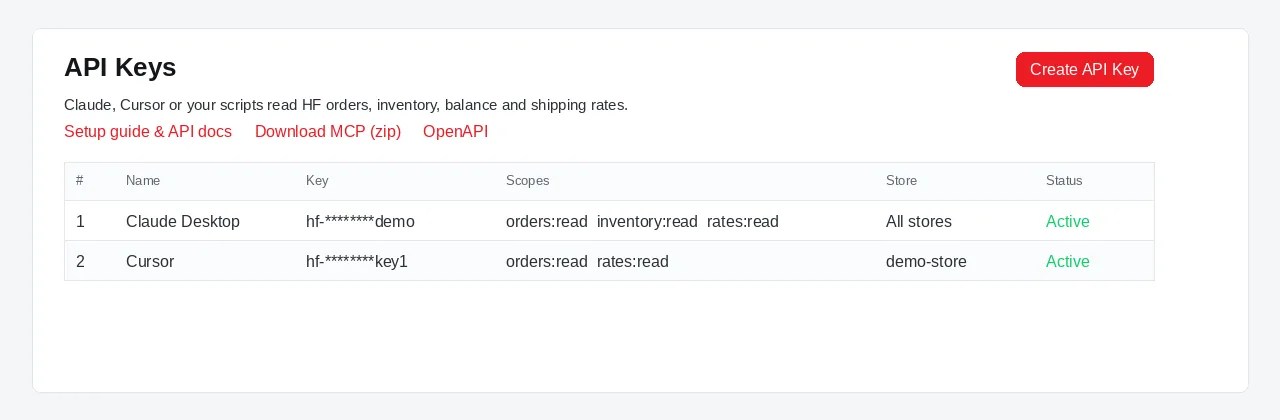
Settings → API Keys issues the key and the MCP zip. Live quotes and order totals are no longer a single number — they break out packing, duty and the rest of the HF bill.
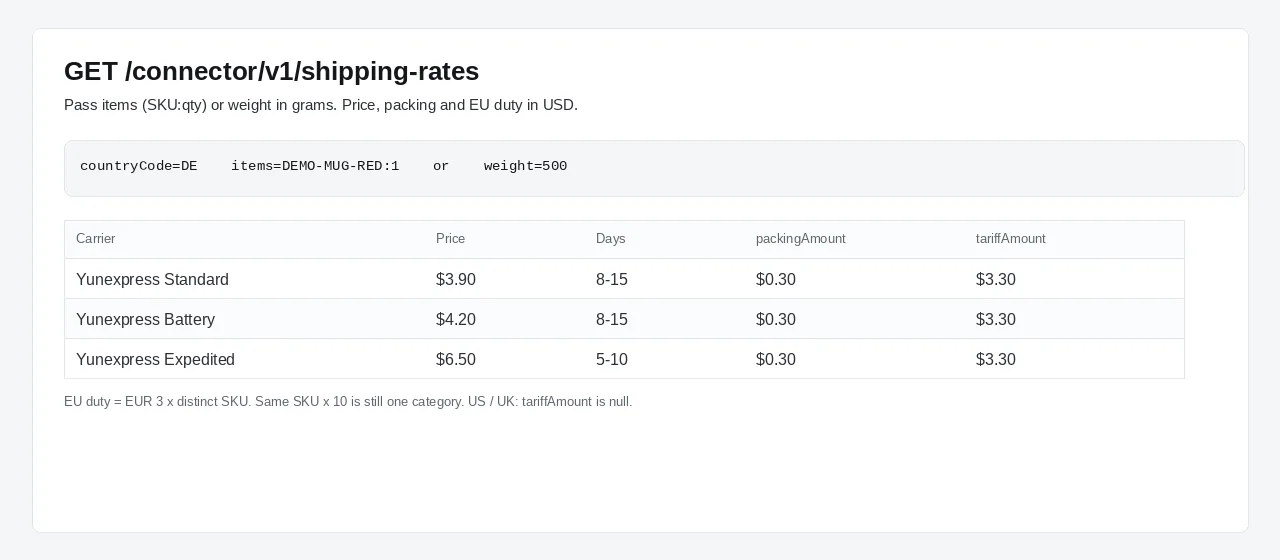
GET /shipping-rates: pass items=SKU:qty or weight in grams. Each line has price, packing and EU duty (€3 × distinct SKU).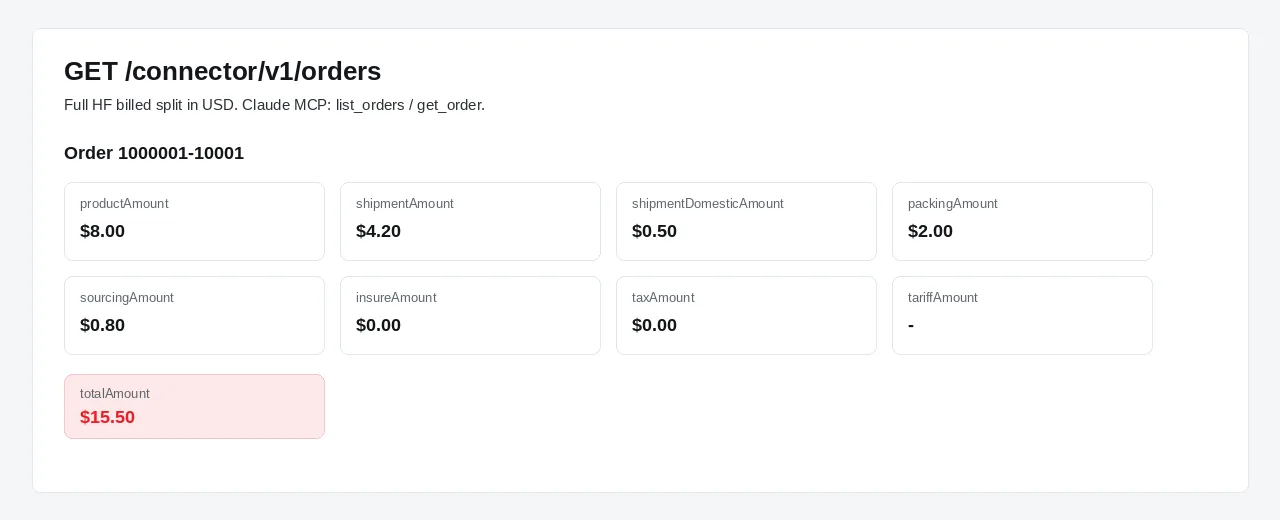
list_orders / get_order return the billed split in USD. confirmAmount on pay must match totalAmount.Live API / MCP
GET /shipping-rates quotes right now: catalog items or grams, packing estimate, EU duty when the destination is EU. Use this for scripts, Claude and Cursor.
Shopify checkout
Rate Sync writes a static delivery profile. Checkout does not call us live. Use Rate Sync so customers see a price at checkout. Shipping zones and Rate Sync →
Connect your AI assistant in four steps
Create a free account
Sign up at app.honestfulphilment.com and connect your Shopify or WooCommerce store.
Create an API key
Open Settings → API Keys, name the key (e.g. “Claude Desktop”), pick its scopes and, optionally, limit it to one store.
Add the MCP connector
Download the MCP connector below, run npm install and add it to Claude Desktop, Claude Code or Cursor with your key.
Ask in plain English
Your assistant now calls our tools directly: no exports, no spreadsheets, no switching tabs.
Claude Desktop config
Unzip the MCP connector, run npm install, then add this to claude_desktop_config.json (Cursor: ~/.cursor/mcp.json). Requires Node.js 18+.
{
  "mcpServers": {
    "hf": {
      "command": "node",
      "args": ["/path/to/hf-claude-mcp/src/index.js"],
      "env": { "HF_API_KEY": "YOUR_API_KEY" }
    }
  }
}
REST API for developers
Prefer your own scripts or agents? Call the same endpoints directly.
BASE=https://api.honestfulphilment.com/connector/v1
KEY=YOUR_API_KEY

curl -H "x-key: $KEY" "$BASE/balance"
curl -H "x-key: $KEY" "$BASE/orders?status=NOT_PAID"
curl -H "x-key: $KEY" "$BASE/shipping-rates?countryCode=DE&items=SKU-123:2"- Base URL
https://api.honestfulphilment.com, paths under/connector/v1 - Auth header
x-key, 60 requests per minute per key - OpenAPI 3 spec and agent guide
REST endpoints
Base URL https://api.honestfulphilment.com/connector/v1. Send your key in the x-key header. Responses use the envelope { status, data, errorCode, errorMessage, pageIndex, pageSize, totalCount }; amounts are in USD; pageSize defaults to 20 (max 100). This API does not create store orders and does not write Shopify checkout rates. Full schemas are in the OpenAPI spec.
| Method | Path | Scope | Description |
|---|---|---|---|
GET | /orders | orders:read | List orders. Filters: status, orderNo, sku, time range, page, pageSize (default 20, max 100). Each row includes the USD cost split; address is on GET /orders/{id} only. |
GET | /orders/{id} | orders:read | One order by HF id or order number, with items, address, tracking and the full USD split (product, shipping, packing, insurance, tax, tariff). |
POST | /orders/{id}/pay | orders:pay | Pay from balance. Body: idempotencyKey (required), confirmAmount (optional, must match USD total). |
GET | /inventory | inventory:read | Warehouse stock per SKU. Filters: keyword, maxQuantity (SQL quantity <=, not a page trim), warehouseCode. |
GET | /inventory/{sku} | inventory:read | One SKU; includeLogs=true adds the inventory ledger. |
GET | /balance | balance:read | Wallet balance and recent billing. |
GET | /billing | balance:read | Billing history between startTime and endTime. |
GET | /shipping-rates | rates:read | Live quote: countryCode, optional postCode, items=SKU:qty or weight in grams. Returns price, packing, EU duty, transit days. |
Built for agents, with guard rails
- Read-only scopes by default; payments are a separate opt-in
- Keys can be limited to a single store and revoked instantly
- Payments need a unique idempotency key and an optional amount check
- Rate limits of 60 calls per minute per key and 10 payments per minute
- The full key is shown only once and never includes your login
Works with your store
Orders from Shopify and WooCommerce stores are available through the same key, with the original platform order numbers.
Behind it: a real warehouse
The data comes from our own China warehouse, sourcing and QC teams. See our services →
AI integration questions
Which AI tools can connect to Honest FulPhilment?
Any client that supports the Model Context Protocol (MCP), including Claude Desktop, Claude Code and Cursor. Developers and other agents can call the same REST API directly with an API key, using our OpenAPI 3 specification.
Can the AI spend my money?
Not unless you allow it. New API keys are read-only by default. Paying orders needs the separate orders:pay scope, every payment requires a unique idempotency key and the pay endpoint is limited to 10 calls per minute.
Is it safe to give an AI assistant an API key?
Each key has only the scopes you choose, can be limited to a single store and can be revoked instantly in Settings → API Keys. Keys are separate from your login session, so the assistant never sees your password.
How much does the AI integration cost?
Nothing. API keys, the MCP connector and the REST API are free for every Honest FulPhilment account. You only pay for products, fulfilment and shipping as usual.
Is there a REST API for developers?
Yes. The base URL is https://api.honestfulphilment.com, endpoints live under /connector/v1 and authentication uses the x-key header. Each key is limited to 60 requests per minute; lists default to 20 records per page (max 100). The OpenAPI 3 spec is public at honestfulphilment.com/ai/openapi-v1.yaml.
What cost fields do orders return?
Every order from list_orders and get_order includes the billed split in USD: product, international shipping, China domestic shipping, packing, sourcing, insurance, tax and tariff, plus the total. The same numbers show in Claude MCP.
Is the shipping-rates API the same as Shopify checkout?
No. GET /connector/v1/shipping-rates is a live quote (items or weight, packing and EU duty). Shopify checkout reads a static delivery profile written by Rate Sync. Use the API or MCP for scripts and agents; use Rate Sync so customers see a price at checkout.
Does it work with both Shopify and WooCommerce stores?
Yes. Orders from every connected Shopify and WooCommerce store are available through the same key, including the original platform order numbers (thirdOrderIds / thirdOrderNos).
Do you have a fulfilment API for Shopify and WooCommerce?
Yes. One connector covers every store on the account — Shopify and WooCommerce. It is a REST API at https://api.honestfulphilment.com/connector/v1 plus an MCP server for Claude and Cursor. Authenticate with the x-key header. It reads fulfilment data from our China warehouse; it is not the Shopify Admin API or the Woo REST API.
Can the API create Shopify or WooCommerce orders?
No. Store orders still import from the Shopify app, a WooCommerce REST key, or a CSV/Excel upload. The connector lists, quotes, and (with an opt-in scope) pays HF fulfilment orders. It does not create storefront orders or write checkout rates.
How do I connect Claude Desktop to my fulfilment account?
Create a key in Settings → API Keys, download the MCP zip, run npm install, and add the server to claude_desktop_config.json with HF_API_KEY. Cursor uses the same entry in ~/.cursor/mcp.json. Node.js 18+ is required.
Fulfilment around the API
Start fulfilling your Shopify and WooCommerce orders from China
Free to connect. Set up your store in minutes and talk to a real account manager.
On WooCommerce? Connect your store free →